
Automotive · 100 × 150 MM
AIAG B-10 Shipping Label Template
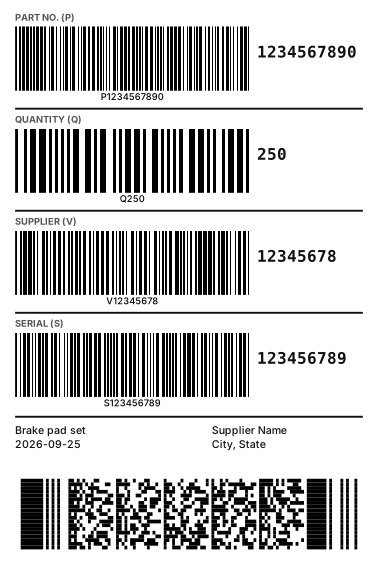
The shipping label common in North American automotive supply chains. Part number, quantity, supplier and serial each get a Code 39 barcode, and a PDF417 packs the same data for one scan.
- No software to install
- Zebra, TSC and more
- Any language prints
Need another size or industry? Go tothe free online label designerand pick from 5 templates by industry, or start from a blank label.
What is AIAG B-10?
AIAG (Automotive Industry Action Group) B-10 is the North American trading partner label specification. Fields are marked with Data Identifiers — part number (P), quantity (Q), supplier code (V), serial (S) and more — linear barcodes use Code 39 and the 2D barcode follows ISO/IEC 15434. The exact fields and layout follow your customer’s supplier manual.
Fields in this template
- Part number (P)
- Quantity (Q)
- Supplier code (V)
- Serial (S)
- PDF417 (ISO/IEC 15434)
- Description, date, supplier name
Mapping an Excel batch
| Column | Example |
|---|---|
| Part number | P1234567890 |
| Quantity | Q250 |
| Supplier code | V12345678 |
| Serial | S123456789 |
| 2D data | [)>{RS}06{GS}P1234567890{GS}Q250{GS}V12345678{GS}S123456789{RS}{EOT} |
One row prints one label. After uploading the Excel file, map each barcode and text to its column under “Field mapping”.
Other Automotive templates
FAQ
Should the large text under the barcode include the P / Q identifier?
The barcode data must include the Data Identifier (e.g. P1234567890), while the large human-readable text shows only the value — the template is already laid out that way.
How do I enter the control characters in the 2D barcode?
ISO/IEC 15434 needs the RS, GS and EOT control characters, which you cannot type. Enter {RS}, {GS} and {EOT} in the barcode data and they are converted when the barcode is generated — the same works in Excel batch cells.
Can I print this directly on my label printer?
Yes. The label designer supports Zebra, TSC, Brother, Epson, cab and more with native printer commands; GS1 and other barcodes are emitted module-exact so widths are precise. Direct printing needs the free Funcode print agent on Windows; without a label printer you can download a PDF and print on any printer.