
Free Online Label Design
Lay out labels in your browser and print straight to TSC, Zebra, Brother and more. Excel batch merge.
An online label designer lays out barcodes, text and logos into a label in your browser, merges an Excel sheet one row per label, and prints straight to a thermal label printer — free, with no label design software or vendor driver to install.
See the fields and uses of 18 industry-standard templates →
- No layout software to install
- No per-printer fees
- All templates free
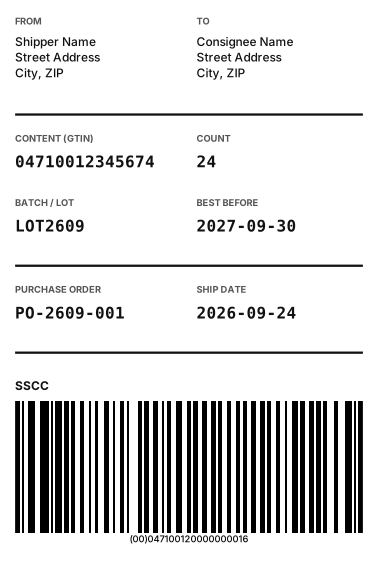
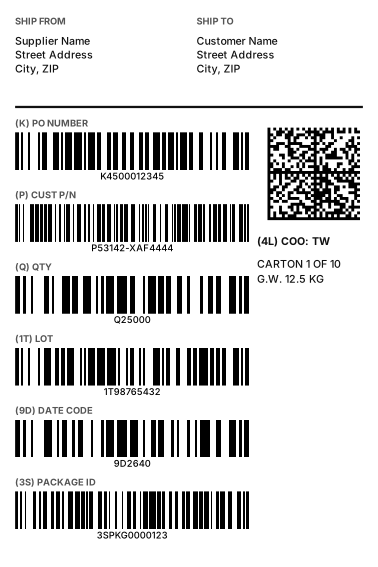
Label design works on a computer. Pick a template here, then open the same link on a computer.
How it works
- 1
Pick a template or start blank
18 industry-standard templates (GS1 logistics, medical UDI, SMT reels, automotive GTL…) come with fields and barcodes set up; size, fonts and positions stay editable.
- 2
Type the data or upload Excel
For one label, type on the canvas. For batches, upload Excel / CSV, paste a table or use the serial generator — one row per label.
- 3
Print directly or download
With a label printer, the free Windows print agent sends to TSC, Zebra, Brother and more. Without one, download a PDF (one page per label) for any printer, or export PNG / SVG / printer command files.
Compared with other approaches
| Online label designer (this site) | Desktop label software | Word / Excel by hand | |
|---|---|---|---|
| Install | None — open in the browser | Install, often per-machine licence | Already there |
| Cost | Design, templates and 50 labels/day free; Print plan unlimited | Mostly paid, by edition / printer count | Free |
| Industry templates | 18 (GS1, UDI, VDA, AIAG…) | Depends on product | None — draw your own |
| GS1 compliance | FNC1, AI brackets in HRI, check digits; module-exact barcode output | Usually | Font-based, often non-compliant |
| Excel batch | Upload / paste / serials, one row per label | Usually | Mail merge, barcodes are painful |
| Direct to label printer | TSC, Zebra, Brother, Epson, cab, SATO, Toshiba, Dymo; USB and network | Yes | Via driver, sizes drift |
| Another computer / sharing | Same URL; labels stored in the browser | Reinstall, move licences | Files passed around |
“Desktop label software” means installable label design products; “Word / Excel” means laying labels out by hand in office software.
At a glance
- Label printers
- Zebra (ZPL / EPL), TSC (TSPL), Brother (native raster), Epson (ESC/POS), cab (JScript), SATO (SBPL, beta), Toshiba (TPCL, beta), Dymo (native raster, beta); other brands via their driver
- Connection
- USB (no vendor driver, RAW queue) and network printers (mDNS scan, direct TCP 9100)
- Resolution
- 203 / 300 / 600 dpi, set from the printer model
- Templates
- 18 industry-standard templates (logistics, electronics, automotive, medical / pharma, retail, general) plus custom sizes — all free
- Barcodes
- 20 1D (EAN-13, Code 128, GS1-128, ITF-14, HIBC…) and 8 2D (QR, GS1 DataMatrix, PDF417, Aztec…) from in-house ISO / AIM / GS1 engines
- Data sources
- Excel / CSV upload, paste from a spreadsheet, in-page grid (100 rows), serial generator (up to 10,000)
- Output
- Direct print, PDF (one page per label), PNG, SVG, ZPL / TSPL / EPL / ESC-POS / cab / SBPL / TPCL command files
- Quota
- Free: 50 labels a day (single + batch); Print plan: unlimited labels and printers
- Platforms
- Design and downloads: any modern browser; direct printing: Windows (free print agent), Mac / Linux via PDF
- Data
- Layout, barcodes and Excel parsing run in the browser; direct printing goes through the local agent to the printer; label data is never uploaded
Supported label printers
Print straight to Zebra, TSC, Brother, Epson, cab, SATO, Toshiba, Dymo and more — print settings follow your printer automatically, with no per-printer fees. Direct printing needs the Funcode print agent (Windows); without a label printer, download a PDF and print on any printer.
FAQ
Can I print directly to my label printer?
Yes. Zebra, TSC, Brother, Epson, cab and more are supported with native printer commands; GS1 and other barcodes are emitted module-exact so widths are precise. Direct printing needs the free Funcode print agent on Windows; without a label printer, download the PDF and print on any printer.
Do I need the vendor driver?
No. The print agent sends commands to a RAW queue, so a USB printer works as soon as it is plugged in; an installed vendor driver does not conflict. The first time, Chrome asks “Allow access to local network devices?” — choose Allow.
Does it work with network (wired / Wi-Fi) label printers?
Yes. Press “Scan network label printers” in the print settings; printers on the same network are listed and printed to over TCP 9100, with no Windows printer setup.
Does it work on Mac / Linux?
Design, Excel batches and PDF / PNG / SVG / command-file downloads all work. Direct printing currently needs the Windows print agent; on Mac / Linux, print the PDF or send the command file to the printer.
How many labels can I print?
The free plan prints 50 labels a day, single and batch combined. The Print plan removes the limit on labels and printers.
Can it print Chinese or other non-Latin text?
Yes. Printer built-in fonts are ASCII-only, so non-ASCII text is rasterized with the same font as the preview and sent as a bitmap — what you see is what prints, including the digits under barcodes.
How is this different from batch barcode generation?
Barcode batch (/batch) turns each Excel row into a barcode image and zips them. Label design merges a whole label (text, logo, several barcodes) with each row and can print straight to the label printer.
Is my data uploaded?
No. Layout, barcode generation and Excel parsing run in your browser; direct printing goes through the local agent to the printer; saved labels live in the browser’s localStorage.
By Funcode (barcode and QR Code software developer, Taipei) · Updated 2026-09-28