
Medical devices & pharma · 60 × 40 MM
Medical Device UDI Label Template
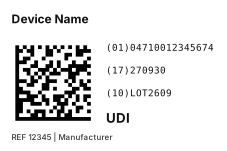
A Unique Device Identification (UDI) label. The device identifier and production identifiers are encoded in a GS1 DataMatrix, with the human-readable interpretation and UDI marking beside it.
- No software to install
- Zebra, TSC and more
- Any language prints
Need another size or industry? Go tothe free online label designerand pick from 5 templates by industry, or start from a blank label.
What is UDI?
A UDI (Unique Device Identifier) consists of a Device Identifier (DI) and Production Identifiers (PI). In the GS1 system the DI is the (01) GTIN and the PI covers (17) expiry date, (10) lot, (21) serial and so on. Regulators such as the US FDA, the EU (MDR / IVDR) and Taiwan’s TFDA require UDI on device labels; accredited issuing agencies include GS1, HIBCC and ICCBBA. Check your regulator for scope and deadlines.
Fields in this template
- GS1 DataMatrix barcode
- (01) GTIN
- (17) expiry date YYMMDD
- (10) lot
- Device name, model REF, manufacturer
Mapping an Excel batch
| Column | Example |
|---|---|
| UDI | (01)04710012345674(17)270930(10)LOT2609 |
| Device name | Device name |
| GTIN | (01)04710012345674 |
| Expiry | (17)270930 |
| Lot | (10)LOT2609 |
One row prints one label. After uploading the Excel file, map each barcode and text to its column under “Field mapping”.
FAQ
Where do I get a GTIN?
A GTIN is built from a GS1 Company Prefix licensed from your GS1 member organisation. If you use the HIBCC system instead, the label designer also has a HIBC medical device template (Code 39 primary + secondary, check character computed automatically).
Will the DataMatrix print clearly on a label printer?
The GS1 DataMatrix is emitted module by module, each module an integer number of printhead dots, so it never distorts from scaling. For small labels a 300 dpi printer is recommended.
Can I print this directly on my label printer?
Yes. The label designer supports Zebra, TSC, Brother, Epson, cab and more with native printer commands; GS1 and other barcodes are emitted module-exact so widths are precise. Direct printing needs the free Funcode print agent on Windows; without a label printer you can download a PDF and print on any printer.