
Electronics manufacturing · 100 × 60 MM
SMT Component Reel Label Template
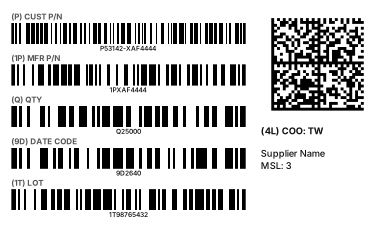
A barcode label for component reels and inner packs. Each field gets its own Code 128, and a DataMatrix packs all fields together so incoming inspection needs a single scan.
- No software to install
- Zebra, TSC and more
- Any language prints
Need another size or industry? Go tothe free online label designerand pick from 5 templates by industry, or start from a blank label.
How are reel label fields defined?
The electronics industry uses ANSI MH10.8.2 Data Identifiers: P customer part number, 1P manufacturer part number, Q quantity, 9D date code (YYWW), 1T lot, 4L country of origin. Each barcode’s data starts with its identifier (e.g. Q25000); the 2D barcode follows ISO/IEC 15434, starting with [)> and separating fields with control characters — the format adopted by the ECIA 2D label (EIGP 114).
Fields in this template
- (P) customer part number
- (1P) manufacturer part number
- (Q) quantity
- (9D) date code
- (1T) lot
- (4L) country of origin
- DataMatrix (ISO/IEC 15434)
Mapping an Excel batch
| Column | Example |
|---|---|
| P customer part | P53142-XAF4444 |
| 1P manufacturer part | 1PXAF4444 |
| Q quantity | Q25000 |
| 9D date code | 9D2640 |
| 1T lot | 1T98765432 |
| 2D data | [)>{RS}06{GS}P53142-XAF4444{GS}1PXAF4444{GS}Q25000{GS}9D2640{GS}1T98765432{GS}4LTW{RS}{EOT} |
One row prints one label. After uploading the Excel file, map each barcode and text to its column under “Field mapping”.
FAQ
Is there a standard reel label size?
There is no single international size; every customer’s receiving specification differs. The template defaults to 100×60 mm and the size and fields can be changed in the editor.
How do I enter the control characters in the 2D barcode?
ISO/IEC 15434 needs the RS, GS and EOT control characters, which you cannot type. Enter {RS}, {GS} and {EOT} in the barcode data and they are converted when the barcode is generated — the same works in Excel batch cells.
Can I print this directly on my label printer?
Yes. The label designer supports Zebra, TSC, Brother, Epson, cab and more with native printer commands; GS1 and other barcodes are emitted module-exact so widths are precise. Direct printing needs the free Funcode print agent on Windows; without a label printer you can download a PDF and print on any printer.